CallFilter: Android call screening and spam-control for busy phones
CallFilter: Caller ID Block, from AppSense Digital, protects Android phones against unwanted and nuisance calls. It performs real-time caller identification and uses a community-reported spam database to automatically block robocalls, scams, and telemarketers before the device rings, with on-screen alerts and a searchable spam history. Controls include blacklist and whitelist management, speed dial, smart contact manager, and customizable call screen themes and smart call history. Suited to Android users who get frequent unknown calls and want granular control of interruptions.

Unlock your creativity with Adobe Stock
Get 10 images or 1 video with a free trial
How CallFilter identifies and blocks nuisance calls
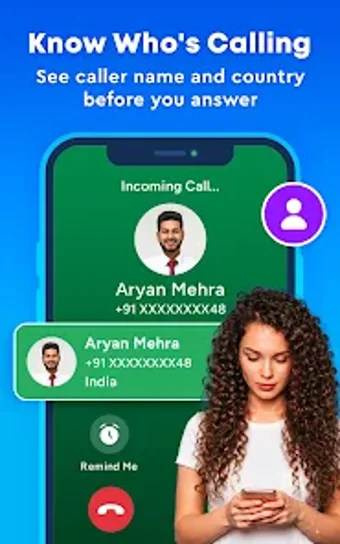
CallFilter matches incoming numbers against a community-reported spam database and displays real-time caller identification so you see a business or flagged label before answering. The app's automatic spam blocker can stop robocalls and suspected scams, and it applies rules without manual intervention. These detection and blocking mechanisms operate at call time, reducing unwanted ring-throughs and offering fast visual cues about caller intent.
How private are your calls with CallFilter?
AppSense states the app adopts a privacy-first approach that does not require contact sharing for basic functionality. The developer also indicates contacts and personal data are kept private and are not sold or shared with third parties. This design separates identification from wholesale contact uploads, so basic caller matching and blacklist functions work without handing over entire address books.
Is CallFilter straightforward to set up and personalise on Android devices?
Getting started requires making the app the default phone handler and granting permissions for call and contact management, a deliberate trade-off for deeper call control. The interface offers a Smart Contact Manager for organizing lists, Speed Dial for quick access, and customizable call screen themes for visual personalization. The installer and background routines are described as lightweight and battery-friendly for daily use on modern devices.
How manageable are interruptions and what platforms are supported?
Incoming-call control is granular: users can add numbers to a Blacklist or Whitelist and tune which calls reach them. Smart Call History records flagged calls so you can review alerts after the fact. The app is available for Android only and targets current Android versions, so cross-device syncing outside that ecosystem is not part of the experience. Compared with a stock dialer, CallFilter centralizes spam data and manual list management.
CallFilter suits focused Android users who want fewer interruptions
CallFilter is a practical choice for Android owners who need proactive control of incoming calls and prefer hands-on list management. Expect to spend time configuring permissions and notification filters to match your tolerance for interruptions; those who avoid changing default handlers may find this setup intrusive. For single-device users seeking concentrated call control, the app delivers a pragmatic trade-off between attention and protection.